
Find Stripe events your app never processed.
See the dollar impact of missed Stripe event processing across the last 30 days.
Connect Stripe with a read-only key in about 2 minutes. First scan is free.
Trust & security
Read-only access with clear data boundaries.
Revenue Recovery Autopilot only reads the Stripe data required to identify revenue leaks. You can revoke access anytime from Stripe Dashboard.
What we read
- Stripe events and delivery status
- Event IDs, timestamps, amounts, and statuses
- Account metadata needed for delivery-state reconciliation
What we store
- Encrypted Stripe connection credentials
- Divergence records and impact calculations
- Alert delivery metadata (email/Slack status)
What we never store
- Card numbers or payment method details
- Write-scoped Stripe credentials
- Raw webhook payloads with unnecessary PII
Revoke access anytime: Stripe API keys
The problem
Broken webhooks cost real money.
Failed Stripe webhooks create business issues beyond engineering: missed revenue, support escalations, and avoidable churn. Here are the three patterns we detect most often in SaaS billing flows.
Revenue loss: paid events never processed
A customer completes checkout, but the revenue-critical Stripe event never reaches your endpoint or is never acknowledged. Provisioning does not run, revenue is delayed, and support load climbs.
Support load: cancellations without downgrade
A subscription is canceled in Stripe, but the cancellation webhook never arrives. Your team must manually reconcile access disputes and billing tickets.
Churn risk: refunds without deactivation
A charge is refunded, but your app never processes it. Access can remain active, revenue reporting gets distorted, and trust drops across finance and support.
How it works
Connect. Scan. Recover.
Revenue Recovery Autopilot connects to your Stripe account with read-only access, scans 30 days of Stripe event delivery history, and shows you every dollar at risk.
Works alongside Stripe Smart Retries — not a replacement
Connect your Stripe
Create a read-only restricted key in Stripe (`events:read`, `accounts:read`) and paste it in the app. Setup takes about 2 minutes and we never write to Stripe.
Scan 30 days
Our reconciliation engine cross-references every Stripe event with its webhook delivery status. No database access needed — we detect divergences from observable behavior.
See your results
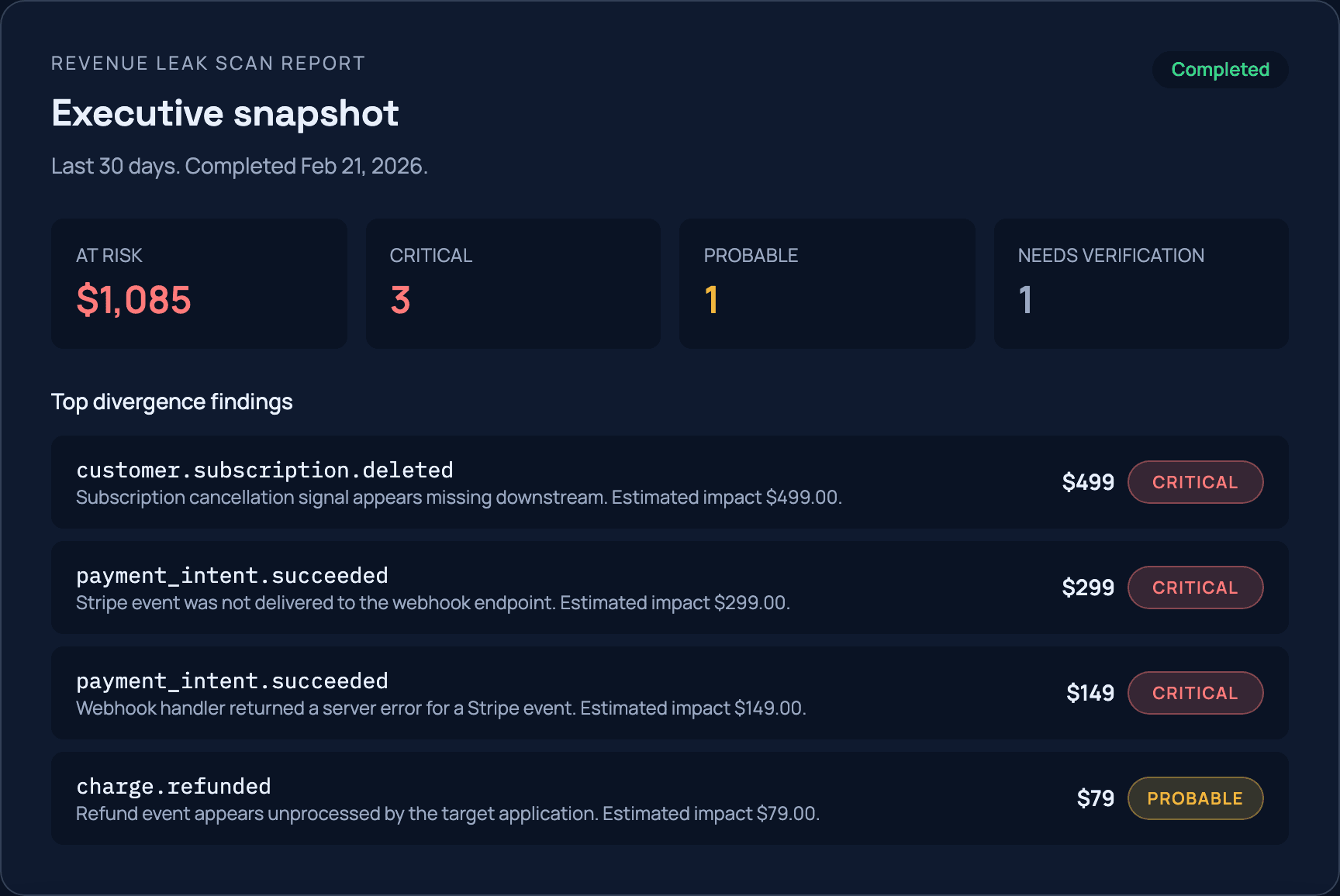
Get a dollar-amount impact report with severity breakdown: critical, probable, and needs verification. Share the results with your team.
Free revenue scanner
How much revenue are you losing?
Connect your Stripe and get your results in minutes. No credit card, no commitment, no sales call.
Read-only access. Results are shareable.
Sample scan results
$8,340
at risk over 30 days
Why it matters
The average SaaS loses 1-5% of revenue to integration failures.
Most teams don’t know it’s happening until a customer complains — or until they churn. Revenue Recovery Autopilot finds the leaks before your customers do.
“We built this after seeing paid customers silently fail provisioning from missed Stripe events. The scanner exists to make that loss visible in minutes.”Engineering @ Katsura Labs
Simple pricing. Scan for free.
Start with a free scan. Upgrade when you want 24/7 monitoring or automatic recovery.
Scanner
FreeSee what you’re losing.
- 30-day historical scan
- Dollar-amount impact report
- Severity breakdown
- Shareable results URL
Monitor
Most chosenKnow the moment revenue leaks.
- Everything in Scanner
- Continuous 24/7 monitoring
- Real-time email + Slack alerts
- Weekly divergence trend dashboard
- Divergence dashboard
Recover
Automatically fix what’s broken.
- Everything in Monitor
- One-click webhook replay
- Automatic recovery mode
- Revenue recovered tracking
- Priority support
All plans include read-only Stripe access. We never write to Stripe objects.
Monitor and Recover require a connected Stripe account.
FAQ
Start with the business questions most teams ask during evaluation.
How much revenue can we actually recover?
It depends on your webhook failure rate and event volume. The free scan quantifies estimated revenue at risk in dollars, so you can decide with data before upgrading.
What do we get in the sample report?
You get estimated revenue at risk, severity breakdown (critical/probable/verify), and concrete divergence examples your team can triage immediately.
Who should review the report?
Typically engineering, support, and finance. The report is designed so non-engineering stakeholders can understand business impact without reading logs.
How quickly can we get value?
Most teams connect Stripe and receive their first 30-day report in under 5 minutes.
Is the free scan really free?
Yes. Connect your Stripe, get your 30-day report, and share it with your team. No credit card, no trial expiration. One scan per Stripe account per 24 hours.
How is this different from Stripe Smart Retries?
They solve different failure modes. Stripe Smart Retries handles failed charges — when a card is declined, Stripe retries the transaction automatically. Revenue Recovery Autopilot handles the other side: when the charge succeeded but the webhook never reached your application. No retry addresses that. We detect and recover those silent failures, so the two work together — not as alternatives.
Technical FAQ (for engineering teams)
How does Revenue Recovery Autopilot detect lost revenue?
We connect to your Stripe account with read-only access and cross-reference revenue-critical Stripe events (such as `invoice.paid`, `payment_intent.succeeded`, `customer.subscription.deleted`, `charge.refunded`) with webhook delivery state. If Stripe shows undelivered events, we flag revenue at risk.
Is this a dunning tool?
No. Revenue Recovery Autopilot is focused on Stripe -> app processing reliability: missed or unacknowledged webhook events, quantified in dollars. Dunning and failed-card retry automation are out of scope.
Do you need access to my database?
No. Revenue Recovery Autopilot detects divergences from Stripe events plus webhook delivery state (for example, undelivered revenue-critical events). No database credentials required.
What Stripe permissions do you require?
A read-only restricted key with `events:read` and `accounts:read`. We read events, payment intents, subscriptions, and webhook delivery attempts. We never write to Stripe or require write-scoped credentials. OAuth app connection is planned after the current restricted-key onboarding.
How accurate is the detection?
Current detection focuses on high-signal cases where Stripe shows webhooks were not delivered for revenue-critical events. Those cases are deterministic from Stripe delivery state; lower-confidence scenarios are labeled for manual verification.
What does “automatic recovery” mean?
On the Recover plan, when we detect a critical divergence (for example, a revenue-critical event that never arrived), we can automatically re-fire the original webhook payload to your endpoint. This is the same idempotent replay mechanism used in production webhook infrastructure.
How long does a scan take?
Most scans complete in under 5 minutes. The time depends on your Stripe event volume. We analyze up to 30 days of history.
Can I share my scan results with my team?
Yes. Every scan generates a shareable URL that anyone can view without logging in. Share it in Slack, email it to your CTO, or include it in a board report.
Infrastructure
Built on HookTrace.
Revenue Recovery Autopilot runs on battle-tested webhook delivery infrastructure used in production for durable ingest, retries, and replay.
Learn more about HookTraceStart now
Find out what you’re losing. Free.
Connect your Stripe account and get an event-delivery impact report in minutes. No credit card. No sales call.
Read-only Stripe access. Results are shareable. Takes less than 5 minutes.